Rotary brushes are essential tools for cleaning dryer vents, air ducts, and various industrial applications. Over time, these brushes can experience wear, lose bristle integrity, or develop mechanical issues that reduce their effectiveness. A well-maintained rotary brush not only ensures optimal cleaning results but also extends the lifespan of your equipment. This rotary brush repair guide provides clear, actionable steps and expert advice to help you restore your brush to peak performance.
Whether you’re a professional cleaner or a homeowner tackling routine maintenance, understanding how to diagnose and fix common rotary brush problems is crucial. Early repairs can prevent costly replacements and minimize downtime. For more advanced insights and troubleshooting strategies, you may also find value in rotary brush system expert tips from industry specialists.
Understanding Rotary Brush Components
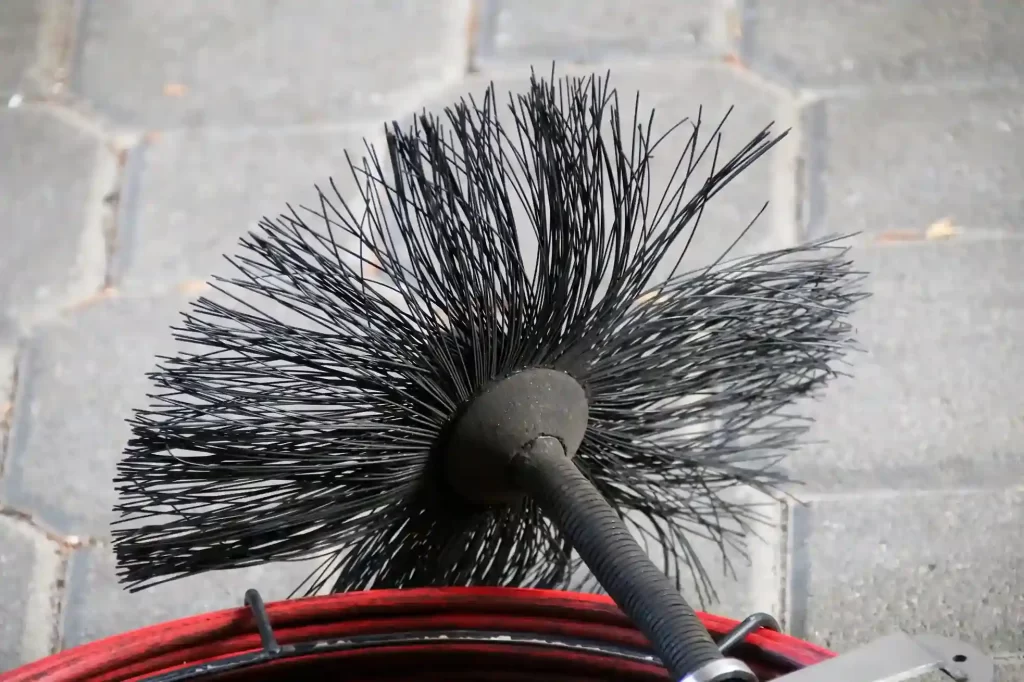
Before diving into repairs, it’s important to recognize the main parts of a rotary brush system. Most units consist of:
- Bristles – The cleaning surface, often made from nylon, polypropylene, or natural fibers.
- Core or Hub – The central structure holding the bristles in place.
- Drive Shaft or Adapter – Connects the brush to the rotary motor or drill.
- Couplings and Fasteners – Secure the brush to extension rods or the drive mechanism.
Knowing these components helps you identify where issues may arise and what parts are serviceable or replaceable.
Common Rotary Brush Problems and Diagnosis
Several issues can affect the performance of your cleaning brush. Here are the most frequent problems and how to spot them:
- Bristle Wear or Deformation: Bristles become bent, frayed, or uneven, reducing cleaning efficiency.
- Loose or Detached Bristles: Bristles fall out or detach from the core, often due to heavy use or manufacturing defects.
- Core Damage: Cracks or breaks in the hub can cause instability or wobbling during operation.
- Connection Issues: The adapter or shaft may become stripped, bent, or fail to lock securely.
Regular inspection is key. If you notice excessive vibration, poor cleaning results, or visible damage, it’s time for maintenance.

Essential Tools and Materials for Rotary Brush Maintenance
Gathering the right tools will make the repair process smoother. Here’s what you’ll typically need:
- Replacement bristles or brush heads (if available for your model)
- Small screwdrivers (flathead and Phillips)
- Pliers and wire cutters
- Epoxy or industrial adhesive (for reattaching bristles or repairing minor cracks)
- Replacement couplings or adapters
- Protective gloves and safety glasses
Check your brush’s manual or manufacturer’s website for compatible parts and recommended adhesives.
Step-by-Step Instructions for Rotary Brush Repair
Follow these steps to restore your rotary brush to working condition:
-
Disassemble the Brush
Disconnect the brush from the drive shaft or drill. Remove any fasteners or couplings holding the brush head in place. Lay out the parts on a clean surface. -
Inspect for Damage
Examine the bristles, core, and connection points. Identify worn, broken, or missing components. -
Replace or Repair Bristles
If bristles are replaceable, remove the damaged ones and insert new bristles according to the manufacturer’s instructions. For minor bristle loss, you can use a strong adhesive to reattach loose bristles, but ensure they are evenly spaced and securely fixed. -
Fix Core or Hub Issues
For small cracks in the core, apply a thin layer of epoxy and allow it to cure fully. If the core is severely damaged, replacement is usually the safest option. -
Check and Repair Connections
Inspect the adapter and coupling for wear or deformation. Replace stripped or bent parts to ensure a secure fit with the drive shaft. -
Reassemble and Test
Put the brush back together, tightening all fasteners. Attach it to your drill or rotary tool and run it at low speed to check for balance and secure attachment.
Always follow safety precautions, including wearing gloves and eye protection, especially when handling adhesives or sharp components.
Pro Tips for Extending Rotary Brush Lifespan
Proper care can significantly increase the durability and performance of your rotary brush. Here are some best practices:
- Clean After Each Use: Remove debris, lint, or dust from bristles and the core. This prevents buildup that can cause premature wear.
- Store Properly: Hang the brush or store it flat to avoid bending the bristles. Keep it in a dry, cool place away from direct sunlight.
- Inspect Regularly: Check for signs of wear or damage before each use. Early detection allows for minor repairs instead of full replacements.
- Use Compatible Attachments: Only use extension rods and adapters designed for your brush model to prevent connection failures.
- Operate at Recommended Speeds: Running the brush at higher speeds than recommended can cause bristle loss and core damage.
For more on quality assurance and maintenance, the rotary brush cleaning quality standards resource offers detailed guidelines for both professionals and DIY users.
When to Replace Instead of Repair
While many issues can be fixed, there are situations where replacement is the safer and more cost-effective choice:
- The core or hub is cracked beyond repair or severely warped.
- Bristle loss is extensive, making the brush ineffective.
- Adapters or couplings are damaged and replacements are unavailable.
- The brush is incompatible with newer equipment or safety standards.
In these cases, investing in a new rotary brush ensures reliable performance and safety. If you’re considering an upgrade, products like the LintEater System or flexible rotary brushes are widely recommended for their durability and efficiency.
Additional Resources for Rotary Brush Maintenance
For those seeking more in-depth knowledge on brush care, maintenance, and troubleshooting, several resources are available:
- Comprehensive maintenance advice can be found in this brush cutter maintenance guide, which covers cleaning, lubrication, and storage tips relevant to rotary brushes.
- Stay informed about rotary brush system future trends to ensure your equipment remains up-to-date with the latest technology and standards.
- If you encounter persistent issues, the rotary brush troubleshooting common issues page provides solutions for frequent problems.
By combining regular maintenance with up-to-date information, you’ll maximize the effectiveness and longevity of your cleaning tools.
Frequently Asked Questions
How often should I inspect my rotary brush for maintenance?
It’s best to inspect your rotary brush before each use, especially if you use it frequently or in demanding environments. Look for signs of bristle wear, core damage, and connection issues. Regular checks help catch problems early and reduce the risk of equipment failure during operation.
Can I replace individual bristles, or do I need a new brush head?
This depends on the design of your brush. Some models allow for individual bristle replacement, while others require replacing the entire brush head. Consult your manufacturer’s instructions or product manual for specific guidance. If only a few bristles are loose, a strong adhesive may be sufficient for minor repairs.
What should I do if my rotary brush vibrates excessively during use?
Excessive vibration often indicates an imbalance caused by uneven bristle wear, a damaged core, or a loose connection. Stop using the brush immediately, inspect all components, and repair or replace any damaged parts. Operating a vibrating brush can cause further damage and reduce cleaning effectiveness.
Where can I find replacement parts for my rotary brush?
Replacement parts are typically available from the manufacturer, authorized dealers, or online retailers. Ensure you purchase parts compatible with your specific brush model. For popular systems, options like the LintEater System provide easy access to replacement heads and accessories.
Maintaining and repairing your rotary brush is a straightforward process with the right knowledge and tools. By following these steps and best practices, you’ll keep your equipment in top condition for years to come.